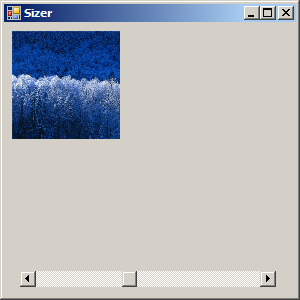
Use ScrollBar to control the picture size
using System;
using System.Drawing;
using System.Collections;
using System.ComponentModel;
using System.Windows.Forms;

public class Sizer : System.Windows.Forms.Form {
    private System.Windows.Forms.PictureBox picCritter;
    private System.Windows.Forms.HScrollBar scrSize;

    public static void Main(){
        Application.Run(new Sizer());
    }
    public Sizer() {
        InitializeComponent();
    }
    private void InitializeComponent() {
      this.picCritter = new System.Windows.Forms.PictureBox();
      this.scrSize = new System.Windows.Forms.HScrollBar();
      this.SuspendLayout();

      this.picCritter.BackColor = System.Drawing.Color.White;
      this.picCritter.Image = new Bitmap("winter.jpg");
      this.picCritter.Location = new System.Drawing.Point(8, 8);
      this.picCritter.Name = "picCritter";
      this.picCritter.Size = new System.Drawing.Size(40, 40);
      this.picCritter.SizeMode = System.Windows.Forms.PictureBoxSizeMode.StretchImage;
      this.picCritter.TabIndex = 0;
      this.picCritter.TabStop = false;

      this.scrSize.Location = new System.Drawing.Point(16, 248);
      this.scrSize.Maximum = 200;
      this.scrSize.Minimum = 50;
      this.scrSize.Name = "scrSize";
      this.scrSize.Size = new System.Drawing.Size(256, 16);
      this.scrSize.TabIndex = 1;
      this.scrSize.Value = 50;
      this.scrSize.Scroll += new System.Windows.Forms.ScrollEventHandler(this.scrSize_Scroll);

      this.AutoScaleBaseSize = new System.Drawing.Size(5, 13);
      this.ClientSize = new System.Drawing.Size(292, 273);
      this.Controls.AddRange(new System.Windows.Forms.Control[] {this.scrSize,
                                                                  this.picCritter});
      this.Name = "Sizer";
      this.Text = "Sizer";
      this.ResumeLayout(false);

  }

  private void scrSize_Scroll(object sender, System.Windows.Forms.ScrollEventArgs e) {
      picCritter.Size = new Size(scrSize.Value, scrSize.Value);
  }
}
Related examples in the same category